
Canva – a creative marketing tool every small business needs!
Are your social media profile banners out of focus or are you and your audience looking at a blank space? Are you wondering how you can create a branded banner that represents your business in a really simply way? Look no further, it’s time to introduce you to Canva!
Not only is it a great tool to be creative with your banners and social media posts, it’s also free! There are paid options as you look through their templates and fancy stickers but you won’t struggle to create something amazing for free.
It’s also really simple to use and so many small businesses are tapping into their cool features. That’s not to say you shouldn’t reach out to a graphic designer, after all they have the creative eye, and if creativity is not your strong point then your images may not have the same visual impact. I’ve been working closely with Helen at HK graphics to really bring social media graphics to life, whilst still keeping in line with our clients branding guidelines.
Not only can you create banners but you can also create video, infographics and Tik Tok videos!
If you’re a small business and you do enjoy a bit of creativity, then do read on to find out more about this marketing-changing tool.
In this article we’ll be looking at how you can create your social media banners.
Canva have all the dimensions set up in their template and all you need to do is search for the social media banner you need. You’ll see in this search I have simply typed in LinkedIn and the banner template appears straight away.
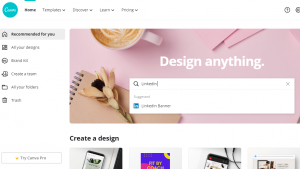
You’ll then be presented with the option to use one of Canva’s templates or create your own. When providing social media management services for my clients I always use the blank template for my clients so I can incorporate their branding.
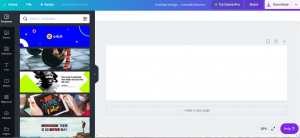
Once you have selected the blank template you’ll see options on the left to add your background, text and any other elements. If you scroll down the sidebar you’ll also see the option to upload images, this is where you can upload your logo and any other branding elements you might want to use.
Now you have finished creating your banner the next step is to save your work. You’ll see the download button on the top right hand side of the page and voila! You now have a banner that will fit perfectly into the channel banner frame!

One of the benefits of investing in Canva Pro is the option to be able to automatically resize your banners for all your social media accounts. They call it ‘Magic Resize’. With the basic version you would need to go back to the home page and follow these guidelines again.
You can try Canva Pro for free for 30days.
Canva Training and Support
There is of course so much more to Canva that will drastically change the visual impact of your brand on social media (and your website).
Online Tutorials
We are currently delivering online tutorials aimed at small businesses to help with all aspects of Canva and their creative elements.
2 hours training – £145
Social Media Banners
Would you like our team of experts to create bespoke banners for your social media channels?
Choose from – LinkedIn, Twitter, YouTube & Facebook
£120
Want to find out more? Please get in touch with us via our online contact form or call Vicky directly on 07950 513 931.
Vicky White Communications are a Digital Marketing Agency in High Wycombe helping our clients to build online visibility and generate leads. Our Marketing services range from one-off projects to ongoing campaigns including social media management, SEO, email marketing, advertising and content creation.


